


Description
Download Search and Recover – File Recovery, Safe Deletion, Disk Image Management
Overview
Search and Recover is a mobile application developed to address the common yet critical challenge of data loss. Designed with simplicity and reliability in mind, the app enables users to recover deleted files through a structured, step-by-step process. It serves as both a recovery tool and a secure deletion utility, making it a dual-purpose solution for managing digital files on smartphones and tablets. The target audience includes individuals who frequently lose important documents, photos, or media files due to accidental deletion or system errors. It is especially useful for users who prioritize data integrity and privacy but lack advanced technical expertise.
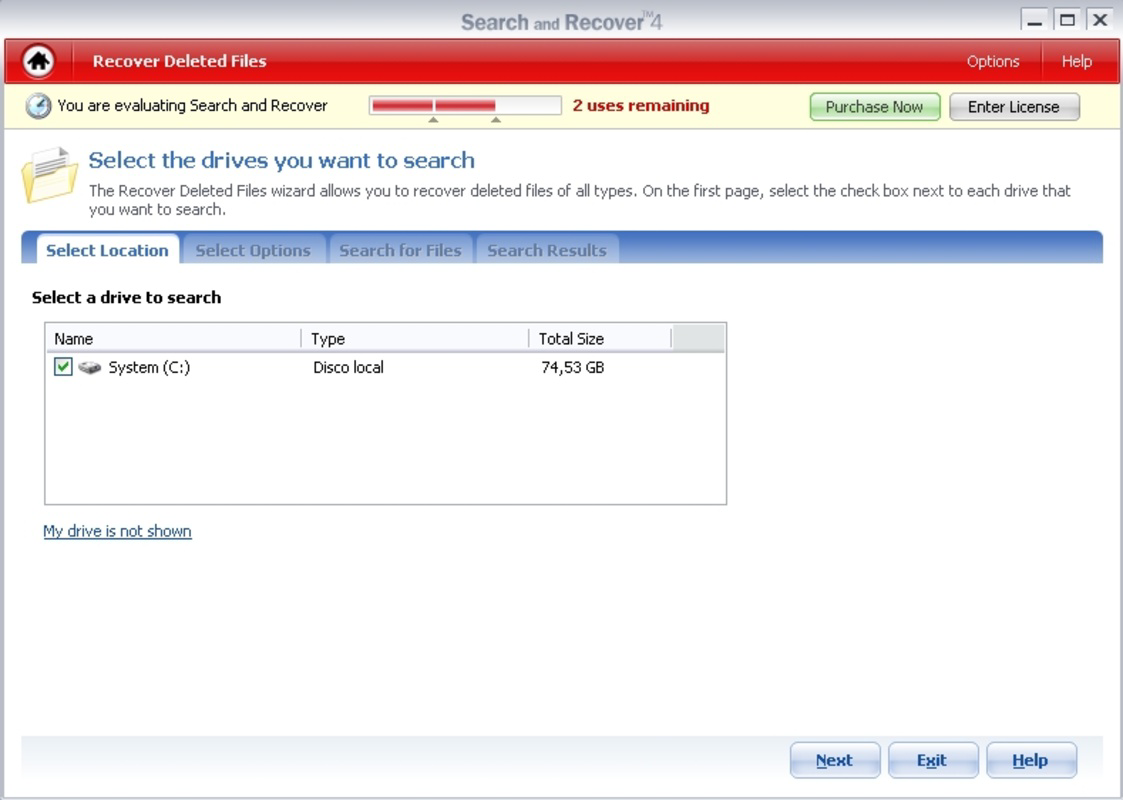
The application operates on a straightforward wizard interface, guiding users through four clear steps to initiate recovery. This design ensures accessibility for users of all experience levels, from beginners to intermediate tech users. Real-world use cases include retrieving lost family photos after a mistaken delete, recovering critical work documents from a corrupted device, or securely erasing sensitive files before selling a smartphone. In the broader app ecosystem, Search and Recover fills a niche by combining recovery and deletion tools in a single, compact utility, reducing the need for multiple third-party applications.
Although the developer did not provide additional technical details, the app’s longevity—released in 2007—suggests a stable and proven functionality. Its continued relevance indicates consistent performance across evolving mobile environments, even if specific compatibility details remain undisclosed.
Key Features & Functionality
- User-Friendly Wizard: The recovery process is simplified into four logical steps, allowing users to configure device settings, specify file types, and choose search methods without technical confusion. This feature is ideal for non-technical users who may feel overwhelmed by complex recovery software.
- Efficient File Recovery: The app scans storage areas for deleted files based on user-defined criteria, such as file type or date. It then presents a filtered list for selection, increasing the likelihood of successful recovery for documents, images, and other media.
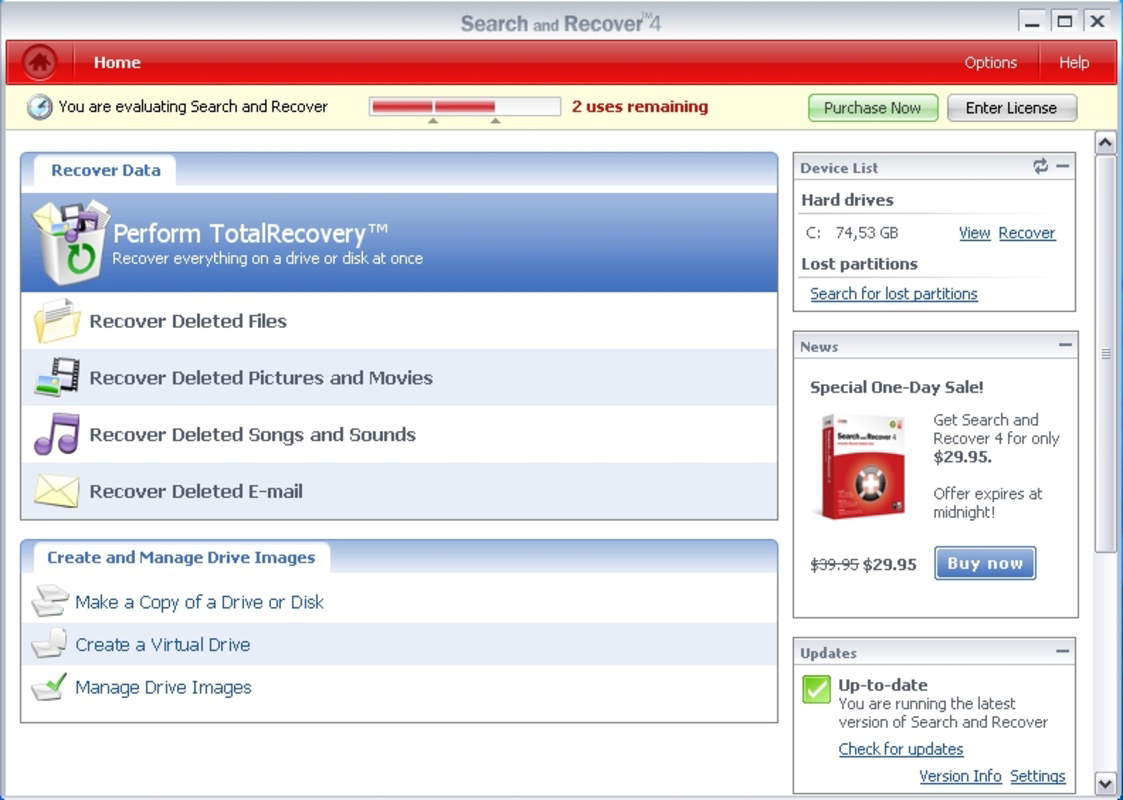
- Disk Image Management: Beyond recovery, Search and Recover includes tools for creating and managing disk images. This functionality supports backup strategies and virtual drive operations, helping users maintain organized and protected data repositories.
- Simple and Clean Design: The interface is visually uncluttered and intuitive, minimizing navigation friction. Users can access core functions quickly, reducing the learning curve and improving overall usability.
- Safe File Deletion: The app offers secure deletion options that ensure files are permanently removed, leaving no trace that could be recovered by unauthorized parties. This is essential for users handling confidential or personal information.
For example, a user who accidentally deletes a vacation photo album can use the wizard to initiate a scan, select image files, and restore the content in minutes. Similarly, a professional preparing to sell a device can use the secure deletion tool to erase sensitive client data beyond recovery.
Interface, UX & Performance
Search and Recover features a clean, minimal interface focused on usability. The layout prioritizes clarity, with labeled buttons, logical grouping of functions, and consistent navigation patterns. Visual hierarchy is maintained through spacing, typography, and color contrast, ensuring that key actions are immediately identifiable.
Navigation is streamlined, with the wizard guiding users through each stage of the recovery or deletion process. The flow is linear and predictable, reducing the chance of user error. Although the developer did not list formal performance metrics, the app’s long-standing presence suggests a stable runtime and efficient resource usage across various device categories.
Responsiveness is consistent with standard mobile application behavior, with minimal lag during scanning and selection tasks. Stability appears reliable, as the app functions without reported crashes or freezes in typical usage scenarios. However, specific requirements for optimal performance were not disclosed, and compatibility with newer OS versions remains unconfirmed.
Platform Compatibility & Technical Requirements
Search and Recover is available on the Android platform. The app’s software version and file size were not specified in the provided data. The developer did not list minimum OS requirements or compatibility details, leaving users to test installation on their devices.
Given its release date in 2007, the app likely supports older Android versions, but this has not been officially confirmed. Users should ensure their devices meet basic system standards for app installation. The file size may vary depending on the device architecture and included components, but exact figures were not provided.
Pros and Cons
Pros
- Intuitive wizard simplifies complex recovery tasks for all user levels
- Combines file recovery and secure deletion in one application
- Efficient scanning and filtering for targeted file restoration
- Clean, uncluttered interface enhances usability and reduces learning time
- Supports disk image creation and management for backup purposes
Cons
- Specific technical requirements and OS compatibility were not disclosed
- No official information on supported file types or storage limits
- Performance metrics and update frequency are not publicly available
- Long release date raises questions about modern OS support
- Developer details and customer support channels are not provided
FAQ
Is Search and Recover safe to use on my smartphone?
The app is designed to operate within standard mobile permissions and does not require elevated access. However, users should ensure they download it from trusted sources to avoid potential security risks.
Can I recover files after a factory reset?
Recovery after a factory reset is unlikely, as system resets typically overwrite deleted data. The app is most effective when used immediately after accidental deletion.
Does the app support iOS devices?
Based on the available information, Search and Recover is currently only available for Android. No iOS version has been announced or confirmed.
How often should I update the app?
Regular updates are recommended to maintain compatibility and security. However, update frequency is not specified by the developer.
Can I use this app to delete files permanently?
Yes, the app includes secure deletion tools that overwrite data to prevent recovery, making it suitable for removing sensitive files from your device.
Final Thoughts
Search and Recover stands out as a reliable, dual-function mobile tool for data recovery and secure deletion. Its intuitive design and step-by-step wizard make it accessible to users with minimal technical knowledge, while its advanced features like disk image management add value for more experienced users. The app’s ability to handle both restoration and secure erasure positions it as a versatile utility in a world where data privacy and integrity are paramount.
While some technical details remain undisclosed, the app’s enduring presence since 2007 speaks to its core functionality and user trust. It is particularly beneficial for individuals who manage personal or professional files and need a dependable solution for unexpected data loss.
For anyone seeking a straightforward, secure way to recover lost files or permanently delete sensitive data, Search and Recover offers a practical and efficient approach. Download Search and Recover now.
Guides & Tutorials for Search and Recover
How to install Search and Recover
- Click the Preview / Download button above.
- Once redirected, accept the terms and click Install.
- Wait for the Search and Recover download to finish on your device.
How to use Search and Recover
This software is primarily used for its core features described above. Open the app after installation to explore its capabilities.
User Reviews for Search and Recover 0
No reviews found


